Your cart is empty
You may check out all the available products and buy some in the shop
Return to shop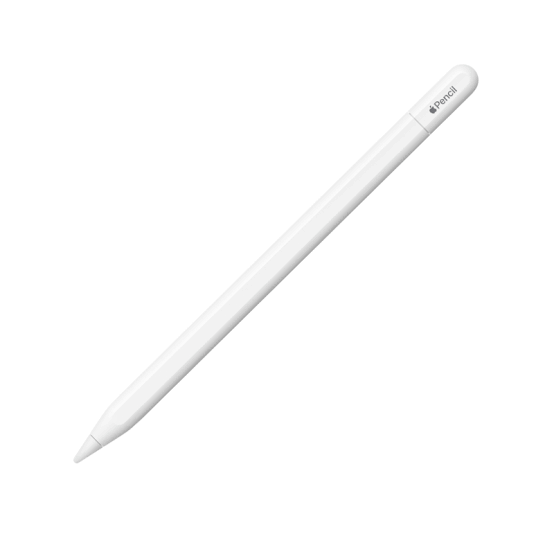

In Stock
KSh18,000.00
The Apple Pencil Pro is Apple’s most advanced stylus, designed for compatible iPad models and professional users who want highly precise writing, drawing, note-taking, document annotation, and creative control. It combines pixel-perfect precision, low latency, pressure and tilt sensitivity, squeeze controls, barrel roll, haptic feedback, Apple Pencil hover, Find My support, and magnetic wireless pairing and charging to provide a highly responsive digital writing experience. It is ideal for artists, designers, students, architects, professionals, and anyone who wants to get the most from a compatible iPad.
The Apple Pencil Pro Price in Kenya makes it a premium accessory for compatible iPad users who need advanced control for creative work, productivity, and digital note-taking. It builds on the familiar Apple Pencil experience while adding new controls that make it easier to switch tools, adjust settings, and interact with supported applications.
At the heart of the Apple Pencil Pro is pixel-perfect precision, allowing users to create accurate lines, handwritten notes, detailed illustrations, and precise annotations directly on the iPad display. Combined with its low-latency response, the Pencil feels natural when writing or drawing because the digital mark appears almost immediately as the Pencil moves across the screen.
The Apple Pencil Pro supports pressure sensitivity, giving users significantly more control while drawing and writing. Applying different amounts of pressure can change the thickness or intensity of a stroke in compatible applications, making it particularly useful for artists and designers.
It also supports tilt sensitivity, allowing compatible applications to respond to the angle at which the Pencil is held. This can be useful for shading, sketching, painting, and creating different stroke effects.
One of the biggest additions is the Squeeze gesture. Users can squeeze the Apple Pencil Pro to perform supported actions such as opening tool palettes, switching tools, changing line thickness, selecting colours, and activating other application-specific functions.
The barrel roll feature provides another layer of creative control. Rotating the Apple Pencil Pro allows supported tools, such as shaped pens and brushes, to rotate naturally on the screen. This is especially useful for artists working with calligraphy, illustration, painting, and other precision-focused creative tools.
The Apple Pencil Pro also includes haptic feedback. When users squeeze the Pencil or perform certain supported actions, a subtle vibration provides physical feedback. This makes controls feel more intuitive and confirms that an action has been recognized.
Another useful feature is Apple Pencil hover, available on compatible iPad models. Hover allows the user to see where the Pencil will make contact with the display before actually touching it. This is particularly useful when drawing, positioning objects, selecting tools, previewing colours, and working with precise digital artwork.
The Apple Pencil Pro also supports double-tap functionality, allowing users to switch between supported tools or perform other configured actions without needing to touch the iPad interface.
The combination of squeeze, barrel roll, double tap, hover, and haptic feedback makes the Apple Pencil Pro more interactive than a conventional digital stylus.
For artists and designers, these features provide greater control over digital brushes, pens, colours, shapes, and other creative tools. The pressure and tilt sensitivity provide natural control over strokes, while barrel roll can provide additional precision with supported brushes.
For students, the Apple Pencil Pro is an excellent tool for handwritten notes, diagrams, mathematics, annotations, presentations, and digital textbooks. Notes can be stored digitally and organized alongside other school or university material.
For professionals, the Pencil can be used for document annotation, signing supported documents, marking presentations, drawing diagrams, editing images, and capturing ideas during meetings.
The Apple Pencil Pro also works well for architects, engineers, and designers who need precise drawing and annotation tools. The ability to control line weight, angle, tool selection, and other supported functions provides a more natural digital drafting experience.
Charging and pairing are handled through the iPad’s magnetic charging system. The Apple Pencil Pro attaches magnetically to compatible iPads, where it can pair automatically and charge wirelessly.
This makes the charging process particularly convenient because the Pencil can remain attached to the side of the iPad when not being used. Users do not need to connect a separate charging cable.
The Apple Pencil Pro also supports Find My, allowing users to locate the Pencil if it is misplaced. This is a useful feature for a compact accessory that can easily be left behind in a classroom, office, studio, or home.
The Pencil is lightweight and designed for comfortable extended use. It measures approximately 166mm in length, has an 8.9mm diameter, and weighs around 19.15 grams.
The matte finish provides a comfortable grip and gives the Pencil a premium appearance that matches Apple’s iPad accessories.
The Apple Pencil Pro is compatible with selected newer iPad Pro and iPad Air models that support it. Compatibility is important because the Apple Pencil Pro does not work with every iPad generation.
The Pencil is especially suited to recent iPad models equipped with the necessary magnetic charging and Apple Pencil Pro support. Buyers should therefore check their exact iPad model before purchasing.
The Apple Pencil Pro is also designed to work with a wide range of compatible applications. Drawing and illustration applications can take advantage of pressure, tilt, barrel roll, squeeze, and hover, while productivity applications can use the Pencil for handwriting, annotation, and document editing.
For digital artists, the Apple Pencil Pro can provide a more traditional drawing experience compared with a basic stylus. Pressure sensitivity allows users to control brush intensity, while tilt and barrel roll provide additional creative options.
For note-taking, handwriting feels natural and precise, making it possible to write directly on the iPad while maintaining organized digital records.
For photographers and content creators, the Pencil can be used for photo editing, masking, precise selection, retouching, drawing, and other creative tasks that benefit from accurate pointer control.
The Apple Pencil Pro Price in Kenya will vary depending on availability and current retail pricing. It is positioned as Apple’s premium stylus, making it particularly suitable for users who intend to take advantage of its advanced creative and productivity features.
The Apple Pencil Pro combines advanced precision with a range of intelligent controls designed for professional creativity and everyday productivity. Its combination of pressure sensitivity, tilt sensitivity, squeeze, barrel roll, haptic feedback, hover, double tap, magnetic charging, and Find My support makes it significantly more capable than a basic digital stylus.
For artists and designers, it provides precise control over brushes, colours, lines, and creative tools. For students, it transforms a compatible iPad into a powerful digital notebook for handwriting, diagrams, mathematics, and annotation. For professionals, it provides accurate document editing, marking, drawing, and creative work.
The Apple Pencil Pro Price in Kenya makes it a premium choice for creative professionals, students, designers, artists, architects, engineers, photographers, content creators, and iPad users who want the most advanced Apple Pencil experience available on compatible iPad models
Check more information in our catalog : https://gadgetarena.co.ke
Only logged in customers who have purchased this product may leave a review.

Sold out

Sold out


Sold out


Sold out


Sold out