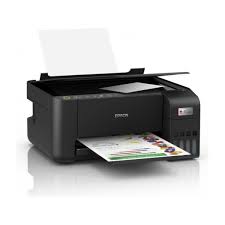
Epson EcoTank L3250 A4 Wi-Fi all – in-one ink Tank Printer ink
In Stock
KSh25,000.00
-
- Functions:Â Print, Scan, Copy (All-in-One).
- Ink System:Â EcoTank with 003 Ink Bottles (high-yield, spill-free).
- Print Speed:Â Up to 33 ppm (Mono), 15 ppm (Color); ISO speeds: 10 ipm (Mono), 5 ipm (Color)
.
- Connectivity:Â Wi-Fi, Wi-Fi Direct, USB 2.0.
- Mobile Support:Â Epson Smart Panel App.
- Resolution:Â 5760 x 1440 DPI.
- Compact Design:Â 37.5 x 34.7 x 17.9 cm; approx. 3.9 kg.
Description
Epson EcoTank L3250 A4 Wi-Fi
Epson EcoTank L3250 A4 Wi-Fi All-in-One Ink Tank Printer Full Specifications, Features and Review
Epson EcoTank L3250 A4 Wi-Fi printer features print, scan, copy functions, ultra-low-cost ink tank system, wireless connectivity, high-resolution output, and reliable performance for home and office use.
Epson EcoTank L3250 Overview
The Epson EcoTank L3250 is a versatile all-in-one ink tank printer designed to meet the needs of home users, students, and small offices. It combines printing, scanning, and copying into a single compact unit while focusing heavily on cost efficiency and ease of use.
One of the biggest challenges with traditional printers is the high cost of ink cartridges. The L3250 solves this problem by introducing a refillable ink tank system that significantly reduces printing costs over time. This makes it ideal for users who print frequently and want to maintain a low cost per page.
With built-in Wi-Fi and mobile printing capabilities, the L3250 allows users to print documents directly from smartphones, tablets, and laptops without needing complex setups. It is designed to deliver convenience, reliability, and long-term value.
Epson EcoTank L3250 Design and Build Quality
The Epson EcoTank L3250 features a clean, compact design that fits easily into most workspaces.
Design Features:
- Compact all-in-one structure
- Integrated front-facing ink tanks
- Minimalist and modern appearance
- Lightweight for easy placement
The printer is designed to occupy minimal space, making it suitable for desks, shelves, and small offices.
Build Quality:
The build quality is focused on durability and practicality.
- Strong plastic construction
- Spill-resistant ink tank system
- Secure and stable design
The front-facing transparent ink tanks allow users to easily monitor ink levels, reducing the chances of running out unexpectedly.
Epson EcoTank L3250 Printing Performance
Printing performance is one of the key strengths of the L3250.
Print Specifications:
- High-resolution printing up to 5760 Ã 1440 dpi
- Fast draft printing speeds for both black and color
- Consistent output quality
Print Experience:
- Sharp and clear text for documents
- Vibrant and accurate colors for images
- Smooth gradients in photo prints
- Reliable output even during continuous printing
The printer performs well for everyday tasks such as school assignments, reports, invoices, and photos. It is designed to maintain consistent quality over long periods of use.
Epson EcoTank L3250 Ink Tank System
The EcoTank system is the standout feature of this printer.
Ink System Features:
- Refillable ink tanks instead of cartridges
- High-capacity ink bottles
- Easy and mess-free refilling process
Ink Efficiency:
- Extremely high page yield
- Low cost per page
- Ideal for bulk printing
Real-World Benefits:
- Reduces long-term printing expenses
- Fewer interruptions for refilling
- Environmentally friendly compared to cartridges
The ink bottles are designed to fit only the correct tank, preventing accidental spills or incorrect refills.
Epson EcoTank L3250 Scan and Copy Functions
The L3250 includes scanning and copying features for added versatility.
Scanner Features:
- Flatbed scanner design
- High-resolution scanning
- Accurate document reproduction
Copy Functions:
- Black and white copying
- Color copying
- Quick duplication
Experience:
- Clear and readable scanned documents
- Reliable copying for everyday use
- Suitable for school and office tasks
The scanner is ideal for digitizing documents, photos, and notes.
Epson EcoTank L3250 Connectivity
Connectivity is one of the strongest aspects of this printer.
Connectivity Options:
- Wi-Fi connectivity
- Wi-Fi Direct support
- USB connection
Wireless Features:
- Print directly from smartphones
- Connect multiple devices easily
- No need for wired connections
Mobile Printing Experience:
- Convenient printing from mobile devices
- Quick setup and easy pairing
- Flexible usage across different devices
This makes the printer ideal for modern environments where multiple users need access.
Epson EcoTank L3250 Paper Handling
The printer is designed to handle everyday printing needs efficiently.
Paper Handling Features:
- Input tray supports standard paper capacity
- Output tray collects printed pages neatly
- Supports multiple paper types
Supported Media:
- A4 documents
- Photo paper
- Envelopes
Additional Features:
- Borderless printing for photos
This makes the printer suitable for both document and photo printing.
Epson EcoTank L3250 Ease of Use
Ease of use is a key focus of the L3250.
User-Friendly Features:
- Simple control panel with buttons
- LED indicators for status updates
- Easy ink refilling process
- Quick initial setup
Real-World Experience:
- Beginner-friendly operation
- Minimal maintenance required
- Smooth day-to-day functionality
Even users with little technical knowledge can operate the printer without difficulty.
Epson EcoTank L3250 Power Efficiency
The printer is designed to be energy efficient.
Power Features:
- Low power consumption
- Heat-free printing technology
- Efficient performance
Benefits:
- Reduced electricity costs
- Environmentally friendly operation
- Less heat generation
This makes it suitable for long working hours without high energy usage.
Epson EcoTank L3250 Durability and Reliability
The L3250 is built for long-term use.
Durability Features:
- Strong internal components
- Reliable ink system
- Consistent performance over time
Reliability:
- Handles frequent printing
- Low maintenance requirements
- Designed for everyday use
This ensures the printer remains dependable even with regular usage.
Epson EcoTank L3250 Key Features Summary
- All-in-one functionality (print, scan, copy)
- High-resolution printing
- Refillable ink tank system
- Ultra-low cost per page
- Wi-Fi and mobile printing support
- Compact and lightweight design
- Borderless photo printing
- Energy-efficient operation
Epson EcoTank L3250 Pros and Cons
Pros:
â Extremely low printing cost
â High ink yield
â Wireless and mobile printing
â Easy to use and maintain
â Compact design
â Reliable performance
Cons:
â No automatic duplex printing
â Slower than laser printers
â Basic control interface
â Not ideal for very large office workloads
Who Should Buy Epson EcoTank L3250?
The Epson EcoTank L3250 is ideal for:
- Students
- Home users
- Small offices
- Teachers
- Anyone who prints frequently
It is perfect for users who want to save money on printing while maintaining good quality output.
Final Verdict
The Epson EcoTank L3250 A4 Wi-Fi All-in-One Ink Tank Printer is a smart choice for anyone looking for a cost-effective and reliable printing solution. It combines high-quality output, low running costs, and modern connectivity features in a compact design.
While it may not include advanced features like automatic duplex printing, it excels in everyday usability and long-term value.
If your priority is affordable, consistent, and convenient printing, the L3250 is a strong option.
Check more information our catalog :Â https://gadgetarena.co.ke
Only logged in customers who have purchased this product may leave a review.