Your cart is empty
You may check out all the available products and buy some in the shop
Return to shop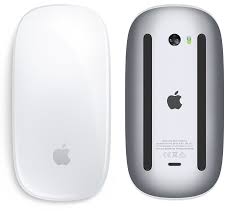
In Stock
KSh18,000.00
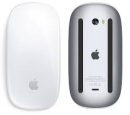
The Apple Magic Mouse is one of the most unique wireless mice ever created by Apple Inc.. Instead of following the traditional mouse design, Apple took a bold approach—combining a sleek minimalist body with a multi-touch surface that behaves almost like a trackpad.
If you’re deep into the Apple ecosystem, this mouse is designed to feel like a natural extension of your Mac or iPad. But it’s also one of the most controversial accessories due to its design choices.
So, is the Magic Mouse worth it? Let’s break it down Gadget Arena style.
| Category | Specification |
|---|---|
| Type | Wireless Multi-Touch Mouse |
| Connectivity | Bluetooth |
| Surface | Multi-Touch Gesture Surface |
| Battery | Rechargeable Lithium-ion |
| Charging Port | Lightning / USB-C (newer versions) |
| Weight | ~99g |
| Compatibility | macOS, iPadOS |
| Battery Life | Up to 1 month per charge |
The Magic Mouse has evolved over time, with newer versions switching from Lightning to USB-C while keeping the same core design.
The Magic Mouse is instantly recognizable.
Design highlights:
It looks clean and premium on any desk, especially next to a MacBook or iMac.
However, the design is very different from traditional ergonomic mice.
The charging port is located on the bottom of the mouse, which means:
This design has been widely criticized over the years, even after updates.
Design strengths:
✔ Premium minimalist look
✔ Lightweight and portable
✔ Perfect match for Apple setups
Design weaknesses:
✖ Not ergonomic for long use
✖ Charging position is inconvenient
The Magic Mouse’s biggest feature is its multi-touch surface.
Instead of a scroll wheel, the entire top surface responds to gestures.
You can:
This makes it feel more modern and intuitive compared to traditional mice.
Gesture strengths:
✔ Smooth scrolling experience
✔ Trackpad-like controls
✔ Great for macOS navigation
If you already use a MacBook, this will feel familiar.
The Magic Mouse uses a laser sensor for precise tracking.
Performance features:
It connects instantly to Mac devices and pairs automatically.
Real-world usage:
Performance strengths:
✔ Reliable daily performance
✔ Smooth navigation
✔ Good for productivity
Battery life is one of its strong points.
Expected usage:
Charging is done via:
The long battery life means you rarely need to charge it.
This is where opinions are divided.
The Magic Mouse has a very flat design, which:
But:
If you use a mouse for many hours daily, this may not be ideal.
Comfort summary:
✔ Good for short to moderate use
✖ Not ideal for long sessions
The Magic Mouse works best within the Apple ecosystem.
Supported devices:
It connects via Bluetooth and pairs automatically.
Outside Apple devices:
The Magic Mouse is ideal for:
Not ideal for:
✔ Premium Apple design
✔ Multi-touch gesture control
✔ Smooth and responsive
✔ Long battery life
✔ Seamless macOS integration
✖ Charging port on the bottom
✖ Not ergonomic for long use
✖ Expensive compared to regular mice
✖ Limited features outside Apple ecosystem
Perfect for:
Not ideal for:
It delivers:
But it also comes with compromises:
If you value design, simplicity, and Apple ecosystem integration, it’s a great choice.
If you prioritize comfort and practicality, you might want to look elsewhere.
A stylish and innovative mouse built for Apple users, but not for everyone.
Check more information in our catalog : https://gadgetarena.co.ke
Only logged in customers who have purchased this product may leave a review.

Sold out


Sold out


Sold out